Inpainting basics: align the mask, original image and model-specific encoding
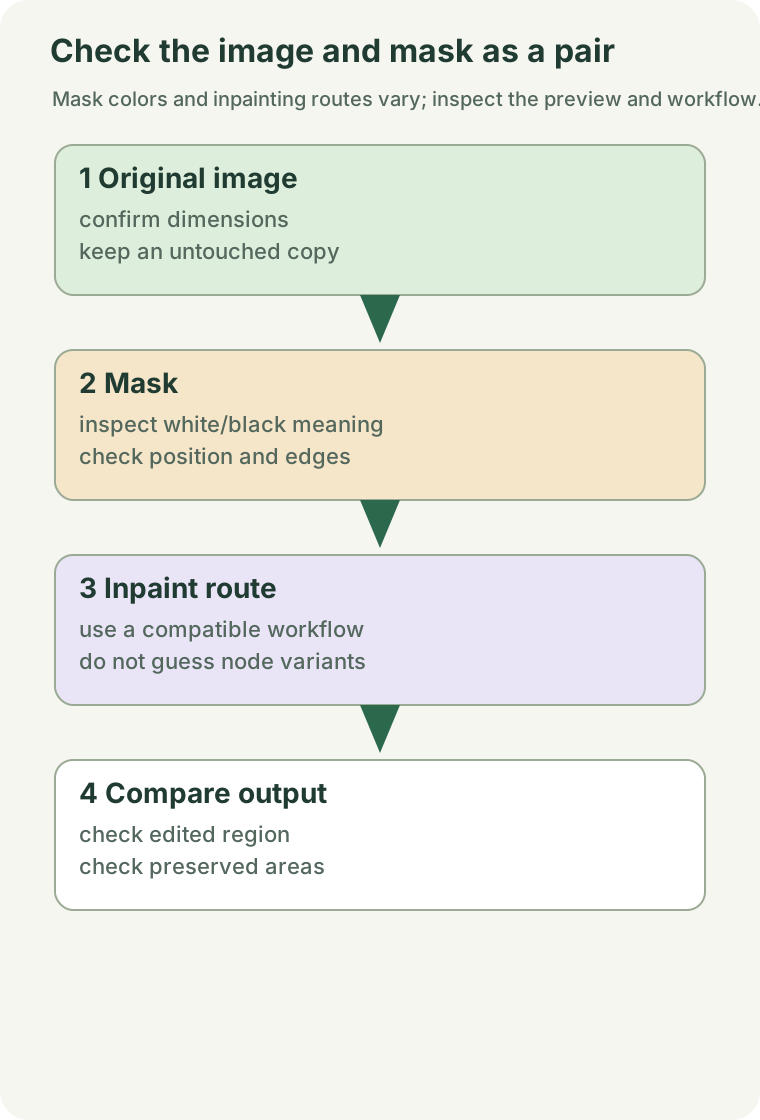
A painted mask is only part of an inpainting workflow. Check the image, mask interpretation and supported model/encoding path together.
Purpose and scope
A painted mask is only part of an inpainting workflow. Check the image, mask interpretation and supported model/encoding path together.

Source-supported context
Official examples include mask editing and an inpainting-specific encoding route. VAE/latent compatibility still matters within masked workflows. Source 1 Source 2
Before you start
1. Select a model and template with explicit inpainting support.
2. Preserve the image and mask and know which mask values the current node treats as the edited region.
3. Confirm spatial alignment and dimensions of the two inputs.
Steps and checks
The sequence below is an editorial procedure based on the cited context, not a diagnosis already confirmed for your environment.
Step 1. Start from a minimal native example and inspect image/mask/VAE connections without importing latents from another model family.
Step 2. Preview the mask and invert only according to the node's semantics, not an assumption based on display color.
Step 3. Test a small region and ordinary prompt, then adjust region size or denoise gradually while checking boundaries and retained content.
Step 4. If everything changes or nothing changes, trace whether the mask reaches the effective sampling path before adjusting prompt strength.
Completion check
The mask aligns with the original, changes occur where intended and boundaries are acceptable. Successful execution does not automatically mean seamless editing.
Limitations and cautions
Specialized image/video editors may implement masks differently. Do not apply this example's nodes and parameters unconditionally to all editing models.
Original sources
- Inpainting workflow — original record checked 2026-09-21.
- ComfyUI model troubleshooting — original record checked 2026-09-21.
Sources rechecked on 2026-09-25. The 2026-09-21 dates above record the earlier source review. No GPU run, minimum-memory measurement or runtime guarantee is supplied.
Related troubleshooting and guides
Was this page helpful?
Anonymous. Only a yes/no counter is stored; no account, IP address or device details.
Sources & references
The official inpainting and model-troubleshooting pages were rechecked on 2026-09-25. No GPU run, minimum-memory measurement or runtime guarantee is supplied.
01Inpainting workflowSource checked: 2026-09-2502ComfyUI model troubleshootingSource checked: 2026-09-25